Android phones come in many brands with varying setup screens. On some common phones such as vivo and Xiaomi, you can simply enter the email username and password and the app configures it automatically. Other Android phones or third-party Android mail apps sometimes require manual setup. This guide uses the QQ Mail app on an Android phone as an example:
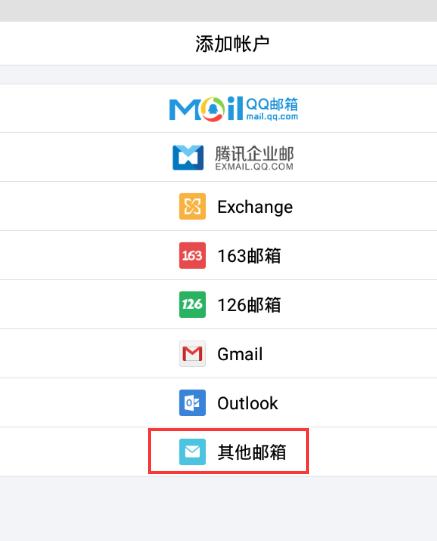
1. Open the QQ Mail app and select “Other mailbox”.
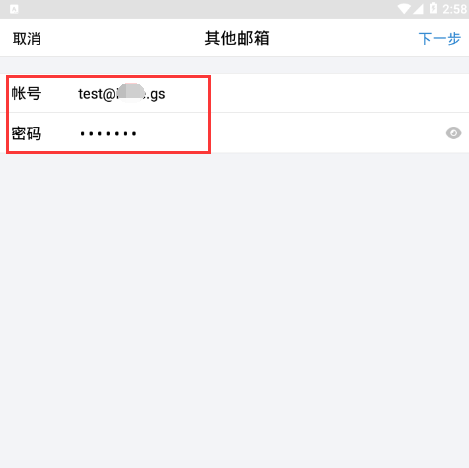
2. Enter the full email account and mailbox password, then click “Next”.
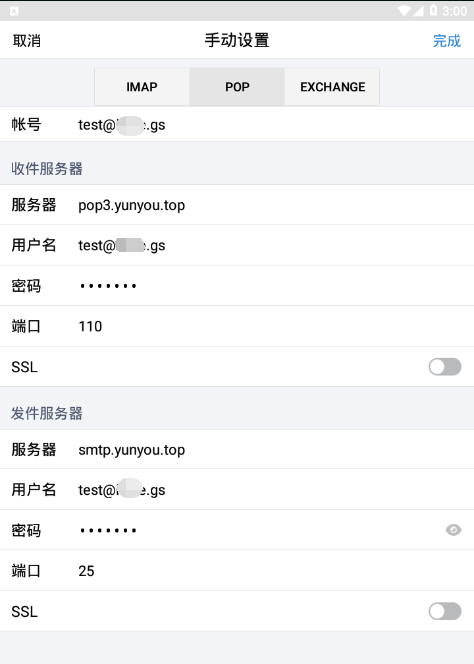
3. Select POP, fill in the incoming server (pop3.yunyou.top) and outgoing server (smtp.yunyou.top) addresses, the username and password, and keep the ports as default. Then click “Finish”. Do not enable SSL.
(If DNS records have been added for your domain, yunyou.top in the incoming/outgoing servers may be replaced with your own domain.)