Winner of HKIRC Gold Cooperation Partner      ICANN & CNNIC Accredited Registrar Eranet official website (852)3999 5400(Sales) WhatsApp:+(852)68882160
Welcome to use The Times Connect help center Help
  • Home
  • Domain Problem
  • Email Problem
  • SSL Certificates Problem
  • Document download
  • Ticket
  • Online Service
    1. Home
    2. Domain related
    3. Manage Domains
    4. How to set the domain name default template

    All questions
    • Domain related
      • Manage Domains
        • How to use dnssec for domain names
        • How do I enable dnssec for domain name resolution
        • How to set the domain name default template
    1. Home
    2. Domain related
    3. Manage Domains
    4. How to set the domain name default template

    How to set the domain name default template

    Last Update Date: 2023-02-17

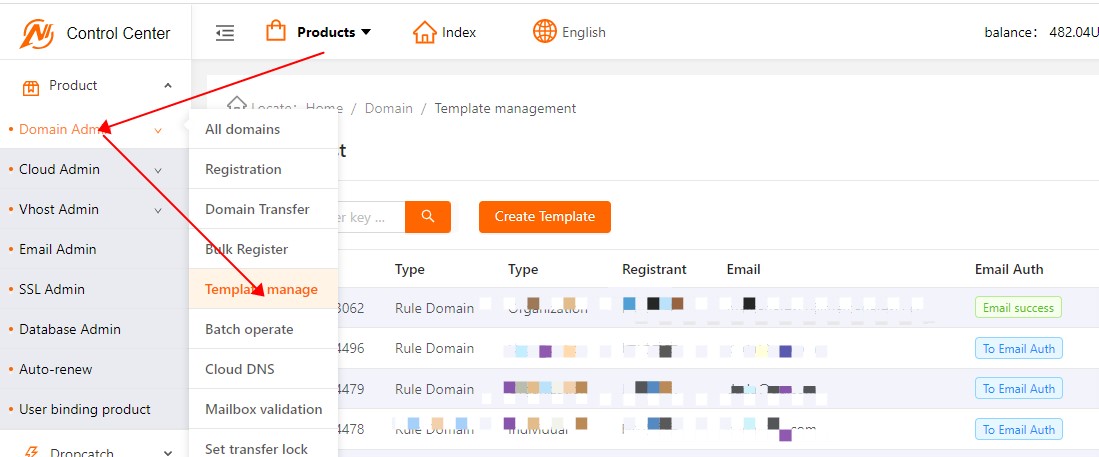
    1. Go to the control center of Eranet, enter the template management page, and operate as shown below
    2. Select the template you want to set, click the default template switch, and operate as shown below
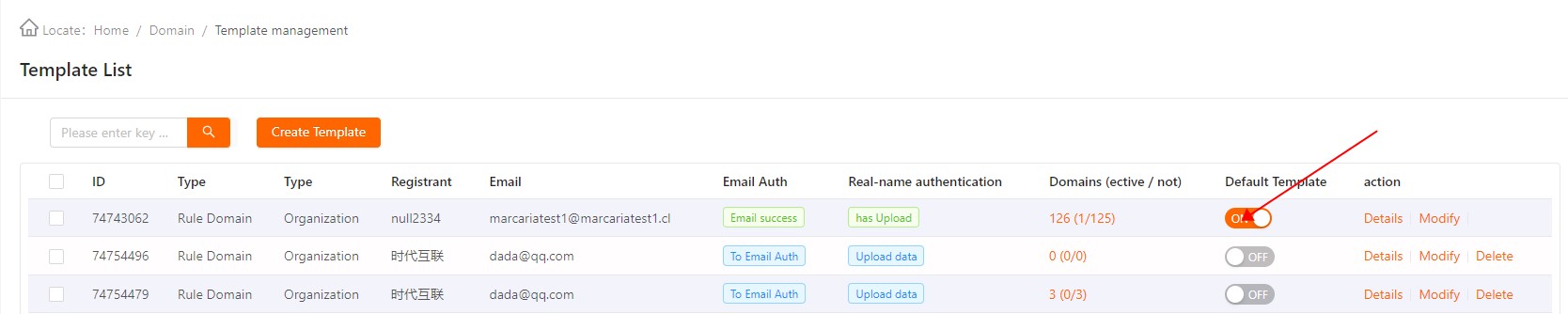
    3, set the default template, you can easily buy the domain name, if you have any questions, you can contact online customer service to solve.


    ←  Prev: How do I enable dnssec for domain name resolution Next: Domain transaction  →
    • Domain related
      • Domain related
      • Certification
      • Domain template
    • Domain transaction
      • Domain transaction
      • Auction
      • Backorders
    • SSL Certificate
      • Common problem
      • Purchase certificate
      • Installation process
    • Cloud enterprise mailbox
      • Excellent mailbox
      • Enterprise mailbox
      • Mailbox Management
    • Cloud server
      • Server management
      • Server upgrade
    • Cloud virtual host
      • Database password
      • Parked domains
    • User account
      • Certification
      • Forget password
      • User logon
    • Financial related
      • Consumption details
      • Value added invoice
      • Online recharge
    • Agent related
      • Representative
      • Agent management
      • Agent
    • Other
      • Trusted website
      • Codeguard
      • Sitelock

    Abuse contact: support@tnet.hk | Abuse procedure | OFTA SBO Licence NO.1544 Business registration certificate: 35450638

    Copyright © 2000- ERANET INTERNATIONAL LIMITED All Rights Reserved